



time:2026-07-22 11:16:51 views:
Industrial environments require reliable computing equipment that can handle dust, moisture, continuous operation, and complex control tasks. An industrial touch screen panel pc provides an integrated solution by combining computing performance, touchscreen interaction, and industrial protection features in one compact device. INNODA develops customized industrial panel PC solutions with IP65/IP66/IP67/IP68/IP69K protection options for automation, transportation, energy, and smart equipment applications.
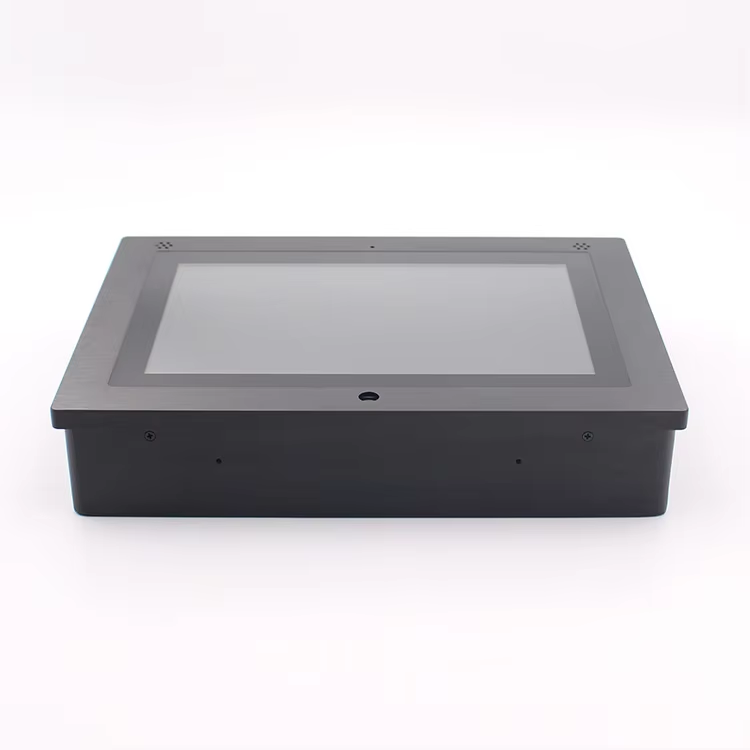
The INNODA 10-inch industrial touch panel PC features an Intel J1900 processor option, sunlight readable display, stainless steel front panel, and multi-point PCAP touch technology. Designed for professional industrial applications, it helps you achieve efficient equipment monitoring, machine control, and data management.
What Is an Industrial Touch Screen Panel PC?
An industrial touch screen panel pc is an all-in-one industrial computer that integrates an LCD display, touchscreen interface, and embedded computing hardware. Compared with standard computers, industrial panel PCs are built with stronger protection structures and flexible installation methods for demanding workplaces.
INNODA industrial touch panel PCs are widely used in:
- Industrial automation control systems
- Manufacturing production lines
- Human-machine interface (HMI)
- Transportation and logistics equipment
- Food and beverage processing facilities
- Medical and educational equipment
- Vehicle control systems
- Smart access control applications
The compact design allows installation through wall mounting, embedded mounting, desktop brackets, or other customized solutions.
Key Features of INNODA Industrial Touch Panel PC
IP65 Waterproof Stainless Steel Front Panel
Industrial equipment often operates in environments where dust and water exposure can affect performance. INNODA industrial panel PCs use a stainless steel front panel with IP65 waterproof and dustproof protection to improve durability.
Main protection features include:
- Stainless steel front bezel design
- IP65/IP66/IP67 protection options
- Dust-resistant and water-resistant structure
- Suitable for industrial and outdoor-related applications
INNODA products have passed CE, RoHS, and FCC certifications, supporting international quality requirements for industrial customers.
Sunlight Readable High Brightness Display
Display advantages include:
- 10.1-inch industrial touchscreen design
- High brightness LCD panel
- Wide viewing angle performance
- Accurate color display
- Fast response capacitive touch operation
The PCAP multi-touch screen provides smooth interaction for control panels, monitoring terminals, and intelligent equipment.
Stable Computing Performance for Industrial Applications
The INNODA IND101PC supports multiple processor configurations, including Intel Celeron J1900, J4105, J4125, J6412, and J6413. Intel Core i3/i5/i7 options are also available for projects requiring higher computing capability.
Technical configuration options:
| Feature | Specification |
|---|---|
| Processor | Intel Celeron J1900/J4105/J4125/J6412/J6413 |
| Memory | 4GB/8GB/16GB/32GB DDR3/DDR4 |
| Storage | 64GB SSD to 1TB SSD |
| Operating System | Windows 7/8/10/11, Linux, Ubuntu |
| Touch Technology | PCAP Capacitive Touch Screen |
| Brightness | 350-1500 nits |
| Interfaces | USB, HDMI, RJ45, RS232, VGA |
Applications of Industrial Touch Screen Panel PC
Different industries require different control methods and installation designs. INNODA provides customized industrial computing solutions to meet various application requirements.
Typical applications include:
Factory automation monitoring
Industrial equipment operation interfaces
Smart manufacturing systems
Digital signage solutions
Transportation control terminals
Energy management equipment
Agricultural machinery systems
Hospital and banking terminals
For example, manufacturers can integrate an industrial touch panel PC into production equipment as an HMI terminal. Operators can monitor machine status, adjust parameters, and manage workflows through an intuitive touchscreen interface.
How to Choose the Right Industrial Panel PC
Selecting the right industrial computer requires evaluating your application environment and system requirements.
Follow these steps:
Define your application scenario
Identify whether the panel PC will be used for automation, monitoring, transportation, or outdoor equipment.Choose the suitable display configuration
Consider screen size, brightness level, and touchscreen technology according to your working conditions.Select the appropriate hardware performance
Choose J1900 processors for standard industrial control tasks or upgrade CPU options for advanced applications.Confirm installation and interface requirements
Check mounting methods and connectivity options such as USB, HDMI, RS232, and RJ45.

