



time:2026-10-09 09:28:28 views:
An industrial touch monitor must do more than display information. In production facilities, food processing plants, vehicle systems, and outdoor installations, moisture, dust, temperature changes, and frequent operator interaction can affect display reliability and usability. A standard commercial monitor may not provide the environmental protection or mechanical durability your equipment requires.
Shenzhen Innoda Technology Co., Ltd. develops customized touchscreen products for industrial and commercial applications, including waterproof touch panel PCs, embedded panel PCs, and industrial monitors. Its IP67 industrial touch monitor combines an aluminum alloy enclosure, projected capacitive touch technology, and a high-brightness LCD panel. Understanding these specifications helps you determine whether this display suits your installation, operating conditions, and system integration requirements.
What Makes an Industrial Touch Monitor Suitable for Harsh Environments?
When selecting an industrial touchscreen monitor, you should evaluate its protection rating, display performance, touch response, enclosure materials, and mounting options together. These factors determine how well the monitor fits your working environment.
IP67 Waterproof and Dustproof Protection
The Innoda industrial touch monitor features an IP67-rated enclosure designed to resist dust ingress and temporary immersion under specified test conditions. This protection can be valuable in environments where dust, splashing water, and routine cleaning are common.
Potential applications include:
Food and beverage processing: Displaying operating parameters and production information in areas exposed to moisture.
Industrial automation: Providing operator interfaces for machinery and production equipment.
Transportation and logistics: Displaying instructions, operating information, and equipment status.
Marine and vehicle equipment: Supporting display installations exposed to challenging environmental conditions.
IP67 does not mean the monitor can withstand every chemical, high-pressure wash, or prolonged underwater operation. You should confirm the applicable test conditions and installation requirements before deployment.
High-Brightness Display for Better Visibility
The monitor supports a brightness range of 1000–1500 cd/m², making it suitable for applications that require greater luminance than many standard office displays provide. Its 21.5-inch LCD/LED panel supports Full HD resolution of 1920 × 1080 pixels and a 16:9 aspect ratio.
These specifications help you display equipment dashboards, production data, process diagrams, and control interfaces with clear visual detail. For direct-sunlight installations, however, you should also assess screen reflections, viewing angles, ambient lighting, and any required sunlight-readable performance.
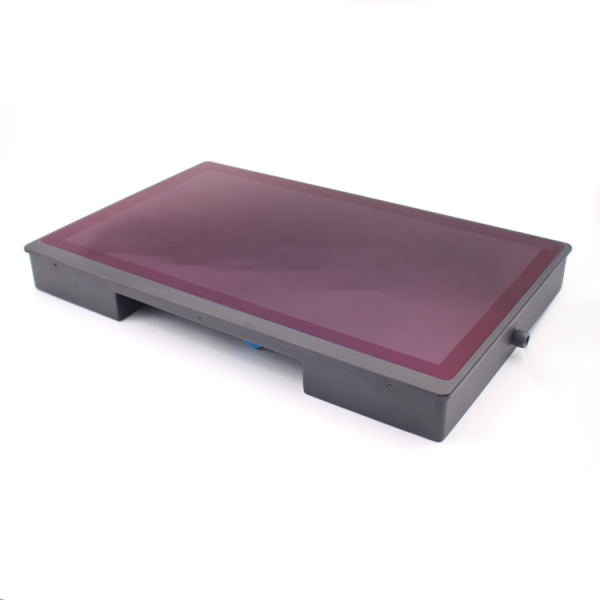
Key Specifications of the IP67 Industrial Touch Monitor
Before purchasing an industrial touch monitor, compare the technical specifications against your equipment requirements.
| Specification | Innoda Monitor |
|---|---|
| Screen size | 21.5 inches; other sizes supported |
| Resolution | 1920 × 1080 |
| Brightness | 1000–1500 cd/m² |
| Touch technology | Projected capacitive touch |
| Touch points | 10-point multi-touch |
| Cover glass | 2 mm chemically strengthened tempered glass |
| Surface hardness | 7H for the specified capacitive touchscreen |
| Operating temperature | -20°C to 70°C |
| Protection rating | IP67 |
| Enclosure | Aluminum alloy; other materials optional |
| Video interface | HDMI and VGA |
| Power input | 12 V DC |
| Mounting | VESA 75 × 75 mm / 100 × 100 mm; other mounting options available |
The manufacturer also specifies optical bonding between the touchscreen and LCD panel. This construction can reduce the air gap between layers and improve perceived display clarity, depending on the final configuration.
Why Choose a Capacitive Touchscreen Monitor?
The projected capacitive touchscreen supports 10-point touch input, allowing operators to interact with compatible interfaces through gestures such as tapping and swiping. Its 2 mm chemically strengthened glass cover offers a specified 7H surface hardness.
Innoda also uses an EETI touch-control solution designed to support touch operation when water droplets are present on the screen. This feature can help in damp working environments, although actual performance depends on water conditions, configuration, and installation.
For your application, consider the following advantages:
Multi-touch interaction: Suitable for interfaces that support multiple simultaneous touch points.
Durable cover glass: Helps resist everyday surface abrasion.
Optical bonding: Supports improved optical performance and reduces the gap between display layers.
Aluminum alloy construction: Provides a rigid enclosure with a sandblasted and hard-anodized finish.
Serviceable enclosure: Sealed front and rear components can be disassembled for inspection and maintenance according to the manufacturer's procedures.
How to Select the Right Industrial Touch Monitor
Follow these steps before placing an OEM or ODM order.
Define your environment. Identify exposure to water, dust, temperature extremes, vibration, and cleaning chemicals.
Choose the screen size. Select 15.6 inches or 21.5 inches according to available installation space and viewing distance.
Confirm display performance. Check resolution, brightness, reflections, and viewing-angle requirements.
Verify touch requirements. Determine whether you need 10-point capacitive touch or an alternative touchscreen technology.
Plan mounting and connections. Confirm VESA dimensions, HDMI or VGA compatibility, 12 V DC power, and cable routing.
Request configuration confirmation. Ask Innoda to verify the exact model's IP67 rating, operating conditions, dimensions, and integration requirements before ordering.
FAQ
1. Can an IP67 industrial touch monitor operate in wet environments?
Yes, an appropriately configured IP67 monitor is designed to resist dust ingress and temporary immersion under specified test conditions. You should verify its suitability for your actual cleaning methods, water exposure, and installation.
2. Does the Innoda industrial touch monitor include a built-in computer?
The supplied specifications describe an industrial touch monitor and do not establish that this particular configuration includes a computer, processor, memory, or operating system. If you require a complete industrial panel PC, confirm the hardware configuration separately.
3. Can Innoda customize the monitor for OEM or ODM projects?
Shenzhen Innoda Technology Co., Ltd. offers customized touchscreen products and OEM/ODM services. Supported options may include screen sizes, enclosure materials, colors, mounting arrangements, and touchscreen technologies. Confirm the available options, minimum order quantity, and lead time with the manufacturer.
Conclusion
Choosing the right industrial touch monitor means matching environmental protection, touch performance, display brightness, and mounting requirements to your actual application. Innoda's IP67-rated configuration offers a 21.5-inch Full HD display, 10-point capacitive touch, 1000–1500 cd/m² brightness, and an aluminum alloy enclosure for demanding industrial installations. By verifying the final configuration and operating conditions before purchase, you can make a more informed decision for your equipment integration project.
CTA
Planning an industrial display integration project? Contact Shenzhen Innoda Technology Co., Ltd. with your required screen size, IP rating, brightness, mounting dimensions, and operating temperature. Request a model-specific datasheet and OEM/ODM quotation to evaluate the right industrial touch monitor for your application.

