



time:2026-11-03 09:30:57 views:
Finding a suitable industrial monitor 12" can be challenging when your equipment has limited installation space but still requires a reliable display and responsive touch operation. Standard commercial monitors may not meet the requirements for industrial temperature conditions, front-panel protection, or continuous operation.
For equipment manufacturers, selecting a display involves more than checking screen dimensions. You also need to consider brightness, resolution, touchscreen technology, mounting compatibility, and available interfaces.
Shenzhen Innoda Technology Co., Ltd. provides a 12.1-inch industrial touch screen monitor designed for embedded systems, automation equipment, and industrial control applications. It combines an industrial LCD panel, projected capacitive touch technology, front IP65 protection, and multiple installation options to support different equipment configurations.
12.1-Inch Industrial Monitor for Compact Equipment Integration
A 12.1-inch display is suitable for equipment that requires a dedicated operator interface without taking up excessive panel space. Its 4:3 screen format and 1024 × 768 resolution make it an option for industrial interfaces that use traditional control layouts.
This industrial monitor is designed for integration into different types of equipment rather than general desktop entertainment.
Typical application scenarios include:
Industrial automation: Displaying machine operating information, production parameters, and control interfaces.
Manufacturing equipment: Providing operators with access to equipment status and operating instructions.
Transportation systems: Serving as a display component in compatible control and monitoring equipment.
Food processing equipment: Supporting touch-based operation in production environments where front-panel protection is required.
Embedded control systems: Integrating a display into machinery cabinets, control panels, and equipment housings.
For OEM manufacturers, the compact screen size and alternative mounting configurations provide additional flexibility when designing equipment interfaces.
Industrial Monitor 12" Technical Specifications
When evaluating an industrial LCD monitor, you should compare the actual display parameters instead of relying only on product descriptions.
The following table summarizes the specifications of Innoda's 12.1-inch model.
Specification | Details |
|---|---|
Screen Size | 12.1 inches |
LCD Type | LCD/LED |
Resolution | 1024 × 768 |
Aspect Ratio | 4:3 |
Brightness | 1000–1500 cd/m² |
Contrast Ratio | 700:1 |
Viewing Angle | 80° × 80° (H/V) |
Touch Technology | Projected Capacitive |
Touch Hardness | 7H (PCAP option) |
Touch Transparency | 95% ±3% (PCAP option) |
Touch Working Life | 10 million touches |
Front Protection | IP65 |
Operating Temperature | -20°C to 70°C |
Storage Temperature | -30°C to 80°C |
Power Input | 12V DC |
USB Interface | 1 × USB 2.0 (USB 3.0 optional) |
Video Interfaces | HDMI, VGA |
Mounting | Wall, Embedded, Desktop, Rack (optional) |
VESA | 75 × 75 / 100 × 100 mm |
Weight | 5 kg |
What Makes This Industrial Touch Screen Monitor Suitable for Industrial Use?
High-Brightness LCD for Better Screen Visibility
Lighting conditions can vary significantly between industrial workshops, production lines, and equipment control stations. A display with insufficient brightness may make operating information difficult to read.
This 12.1-inch industrial monitor offers a brightness range of 1000–1500 cd/m². You can select a suitable configuration according to the ambient lighting and installation environment.
Its 1024 × 768 resolution and 700:1 contrast ratio provide the basic display specifications needed for industrial interface applications.
If your project involves direct sunlight, you should also confirm whether additional optical bonding or sunlight-readable configurations are available.
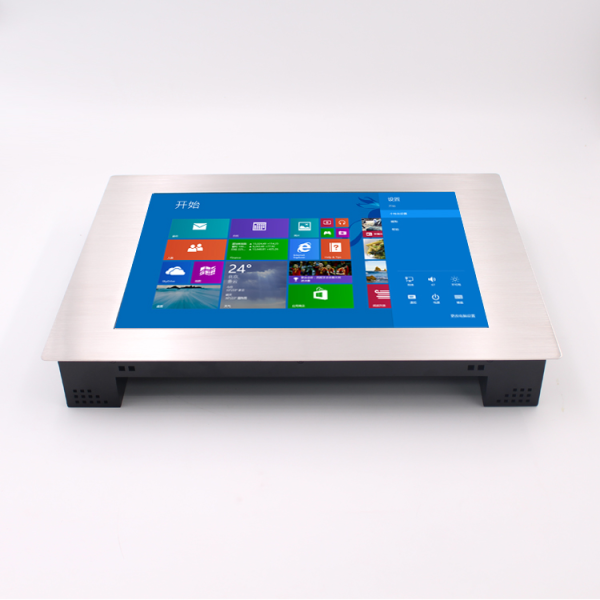
PCAP Capacitive Touchscreen with 7H Surface Hardness
Touchscreen responsiveness affects how efficiently operators interact with industrial equipment.
The projected capacitive touchscreen option supports multi-point touch operation and offers the following specifications:
7H surface hardness for the PCAP configuration.
95% ±3% transparency for clear screen visibility.
10 million touches specified working life.
High-sensitivity touch response.
Different applications may require different touch technologies. Innoda also offers 4-wire resistive, 5-wire resistive, SAW, and infrared touchscreen options.
For example, PCAP technology is suitable for applications requiring multi-touch interaction, while resistive touch can be considered when the operating interface requires a different input method.
Front IP65 Protection for Industrial Environments
Dust and water exposure can affect display operation in manufacturing and industrial settings. This model features an IP65-rated front panel, providing protection against dust and water jets when correctly installed.
Its specified operating temperature range is -20°C to 70°C, allowing it to serve in various indoor industrial environments with changing temperatures.
However, you should distinguish between front-panel protection and complete enclosure protection. If your application requires full IP65 protection or higher waterproof ratings for the entire monitor, confirm the enclosure design with Innoda before ordering.
Multiple Mounting Options for Equipment Integration
Installation compatibility is another important consideration when sourcing an embedded industrial monitor.
This model supports several installation methods:
Embedded mounting: Integrates the display into a machine panel or equipment housing.
Wall mounting: Suitable for fixed industrial display positions.
Desktop bracket mounting: Provides a convenient option for workstations.
Rack mounting: Available as an optional configuration.
The 75 × 75 mm and 100 × 100 mm VESA mounting patterns provide additional installation flexibility.
Industrial Monitor vs. Industrial Panel PC: Which Should You Choose?
Industrial monitors and industrial Panel PCs may look similar, but they serve different purposes. Understanding the difference helps you avoid selecting equipment that does not match your system architecture.
Comparison | Industrial Monitor | Industrial Panel PC |
|---|---|---|
Primary function | Display and touch interaction | Computing and display |
Processor | External computer required | Integrated processor |
Operating system | Depends on connected system | Depends on configuration |
Touchscreen | Optional or integrated | Available |
Main application | External system display | Independent industrial computing |
Suitable buyers | Equipment integrators and machine manufacturers | Buyers needing an all-in-one computer |
The Innoda 12.1-inch product is positioned as an industrial touch screen monitor. Its listed specifications include HDMI, VGA, USB, and DC power interfaces, but do not specify an integrated processor, memory, storage, or operating system.
Therefore, if your project already uses an industrial computer or controller, this monitor may be a suitable display component. If you need an independent computing device, consider Innoda's industrial Panel PC product range.
How to Configure an Industrial Monitor for Your Project
Before purchasing a 12-inch industrial monitor, follow these steps to confirm that the selected configuration matches your equipment.
Define the screen requirements: Confirm whether 12.1 inches, 1024 × 768 resolution, and a 4:3 aspect ratio fit your application.
Determine the brightness level: Choose between the available 1000–1500 cd/m² configurations according to the lighting environment.
Select the touchscreen technology: Specify PCAP, resistive, SAW, or infrared touch based on your operating requirements.
Confirm the enclosure material: Choose aluminum alloy, stainless steel, or another available metal configuration.
Check installation dimensions: Verify the embedded opening, VESA mounting pattern, and available installation space.
Verify interface compatibility: Confirm HDMI, VGA, USB, and 12V DC requirements with your existing equipment.
Providing these details during the quotation stage helps the manufacturer evaluate your requirements and recommend an appropriate configuration.
FAQ
1. What is the brightness of this 12.1-inch industrial monitor?
The specified brightness range is 1000–1500 cd/m². The appropriate configuration depends on your installation environment and visibility requirements.
2. Does this industrial monitor support stainless steel housing?
Yes. The product specifications list aluminum alloy, stainless steel, and metal as frame material options. You can discuss the required enclosure material with Innoda.
3. Can this industrial touch monitor be installed inside a machine cabinet?
Yes. It supports embedded mounting, as well as wall and desktop bracket installation. The optional VESA dimensions are 75 × 75 mm and 100 × 100 mm. Confirm the installation dimensions before finalizing your equipment design.
Conclusion
Selecting the right industrial monitor 12" requires careful consideration of display brightness, touchscreen performance, environmental protection, and installation compatibility. Innoda's 12.1-inch industrial touch screen monitor offers 1024 × 768 resolution, 1000–1500 cd/m² brightness, PCAP multi-point touch, front IP65 protection, and multiple mounting configurations.
With more than 13 years of experience in customized touch panel products, Shenzhen Innoda Technology Co., Ltd. provides OEM/ODM services for industrial monitors, industrial Panel PCs, embedded displays, and other touch panel products. Its product portfolio includes CE-, RoHS-, and FCC-certified products, with different IP-rated configurations available.
Get a Customized Industrial Monitor Solution
If you are developing industrial machinery, automation equipment, or embedded control systems, contact Innoda to discuss your display requirements.
Provide your preferred screen size, brightness, touchscreen type, enclosure material, and installation method. The Innoda team can help you evaluate the available configurations for your OEM/ODM project.

