



time:2026-11-10 11:47:56 views:
An industrial panel PC 10.1 can help you operate machinery, monitor production data, and manage equipment without relying on a separate computer and display. However, choosing the wrong unit can create problems with screen visibility, installation space, touch response, and environmental protection. These issues matter when you install computing equipment in manufacturing facilities, warehouses, transportation systems, or outdoor control stations.
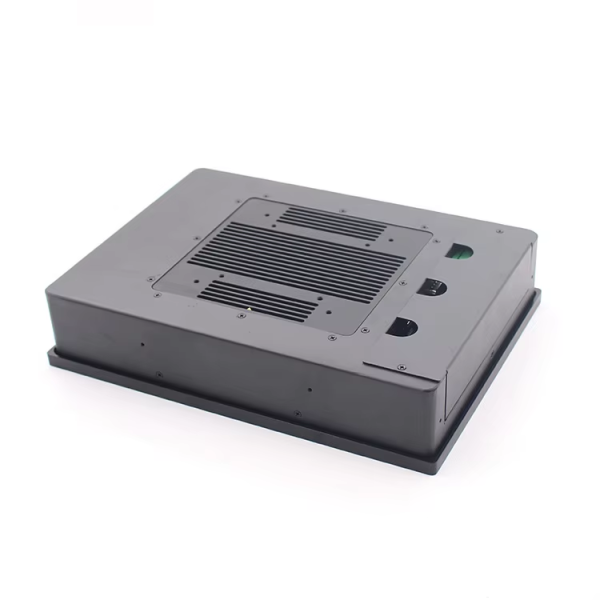
The INNODA IND101PC industrial touch panel PC combines a compact touchscreen with configurable computing hardware and multiple mounting options. Developed by Shenzhen Innoda Technology Co., Ltd., it supports industrial applications that require an integrated human-machine interface (HMI). Its key features include a 10.1-inch display, projected capacitive (PCAP) touch, optional high-brightness configurations, and IP65 protection on the front panel.
Why Choose an Industrial Panel PC 10.1?
A compact industrial computer helps you integrate monitoring and control functions into limited spaces. Instead of installing a separate monitor and computer, you can use one panel-mounted device to access operating interfaces, production information, and equipment controls.
The INNODA IND101PC is designed for applications where space efficiency and direct touchscreen operation are important.
Key features include:
10.1-inch touchscreen: Provides a compact interface for equipment monitoring and operator input.
Capacitive touch technology: Supports responsive interaction with compatible industrial applications.
High-brightness options: Configurations are listed at 350–1500 nits, subject to the selected display specification.
IP65 front protection: Helps protect the front panel against dust and water jets when correctly installed.
Flexible mounting: Supports wall mounting, embedded installation, and desktop brackets.
Configurable computing hardware: Optional processors, memory, storage, and operating systems accommodate different project requirements.
These features make the panel PC suitable for equipment interfaces, production monitoring stations, and other industrial control applications.
Technical Specifications of the INNODA IND101PC
Before selecting an industrial panel PC, compare its display, processing performance, connectivity, and operating conditions with your actual application requirements.
| Specification | Available configuration |
|---|---|
| Product model | IND101PC |
| Screen size | 10.1 inches |
| Touchscreen | Capacitive touch |
| Resolution | 1280 × 800 pixels |
| Brightness | 350–1500 nits, depending on configuration |
| Processor | Intel Celeron J1900 and other optional processors; Core i3/i5/i7 options listed |
| Memory | 8GB, 16GB, or 32GB listed for this configuration |
| Storage | 128GB, 256GB, 512GB, or 1TB SSD options |
| Operating system | Windows 10/11 or Linux |
| Interfaces | HDMI, COM, USB, RJ45, audio jack, and DP as listed |
| Front protection | IP65 |
| Warranty | 1 year |
Confirm the final bill of materials with INNODA before ordering. The supplied general specification sheet also lists other screen sizes, resolutions, memory options, and processors. Actual interfaces and operating-system compatibility may vary by configuration.
Where Can You Use an IP65 Industrial Panel PC?
An industrial panel PC should match the physical conditions and workflow of its installation environment. The IND101PC can be considered for several applications.
Manufacturing and Industrial Automation
Install the panel PC near production equipment to display machine status, operating parameters, alarms, and process information. Operators can interact with compatible control software through the touchscreen, provided the selected hardware and software meet the system requirements.
Outdoor Equipment and Transportation
For roadside equipment, vehicle-related systems, and transportation control stations, a high-brightness display can improve readability under strong ambient lighting. Select a suitable brightness level based on actual sunlight exposure, and verify the complete unit's environmental ratings before outdoor deployment.
Warehouses and Logistics Facilities
A compact touchscreen can serve as an interface for inventory workflows, equipment monitoring, or logistics management software. Ethernet and serial interfaces may support integration with compatible industrial devices and networks.
Industrial Panel PC vs. Industrial Monitor
Choosing between an industrial panel PC and a standalone industrial monitor depends on how you plan to operate your equipment.
| Comparison | Industrial Panel PC | Industrial Monitor |
|---|---|---|
| Computing hardware | Integrated computer | Usually requires an external computer |
| Touch operation | Available on supported configurations | Depends on the model |
| Installation | Integrated computing and display unit | Display installed with a separate computing device |
| System integration | Suitable for compatible local applications | Depends on the connected computer |
| Typical applications | HMI, machine control, production monitoring | Remote display, equipment visualization |
Choose an industrial panel PC when you need integrated computing and touchscreen operation. A standalone monitor may be more appropriate when your existing system already has a dedicated industrial computer.
How to Select the Right 10.1-Inch Industrial Panel PC
Follow these steps before placing your order.
Define your operating environment. Determine whether the device will be installed indoors, outdoors, or in an area exposed to dust, moisture, or temperature changes.
Confirm screen visibility. Compare the available brightness options with ambient lighting conditions. Do not assume every configuration supports the maximum listed brightness.
Match the computing hardware. Select a processor, memory capacity, and SSD size based on your software and workload.
Check connectivity. Confirm the required USB, HDMI, Ethernet, COM, and other interfaces against your equipment's connection requirements.
Choose the mounting method. Verify panel cutout dimensions, VESA compatibility, installation clearance, and cable access.
Request configuration confirmation. Ask INNODA to confirm the exact screen size, resolution, operating temperature, protection rating, and operating-system support for the selected model.
This process reduces compatibility risks and helps you specify a panel PC that fits your project rather than paying for unsuitable features.
FAQ
1. Does this 10.1-inch industrial panel PC support Windows and Linux?
Yes. The product information lists Windows 10/11 and Linux support. Confirm compatibility with your preferred operating-system version, drivers, and application software before purchasing.
2. Can I customize the industrial panel PC for my project?
INNODA offers OEM/ODM services and configurable hardware options. You can discuss processor selection, memory, storage, interfaces, mounting, and display requirements with the manufacturer to determine which combinations are available.
Conclusion
Choosing the right industrial panel PC 10.1 helps you build a more efficient and space-saving control system. The INNODA IND101PC combines a compact touchscreen, configurable computing hardware, multiple connectivity options, and IP65 front-panel protection to support a range of industrial applications. With INNODA’s OEM/ODM customization services, you can specify the display, processor, memory, storage, and mounting method according to your project requirements.
CTA
Planning an industrial control or equipment integration project? Contact Shenzhen Innoda Technology Co., Ltd. to discuss your required screen brightness, processor, memory, storage, interfaces, and mounting method. Request a configuration recommendation and detailed specification sheet for the IND101PC before finalizing your design.

