



time:2026-10-27 17:01:14 views:
Industrial 7 inch monitor solutions help you integrate clear visual interfaces into compact machines, control panels, and equipment where space, durability, and reliable operation matter. However, standard commercial displays may not suit industrial environments that require front-panel protection, responsive touch input, and flexible installation. Choosing the wrong display can also complicate equipment integration and maintenance.
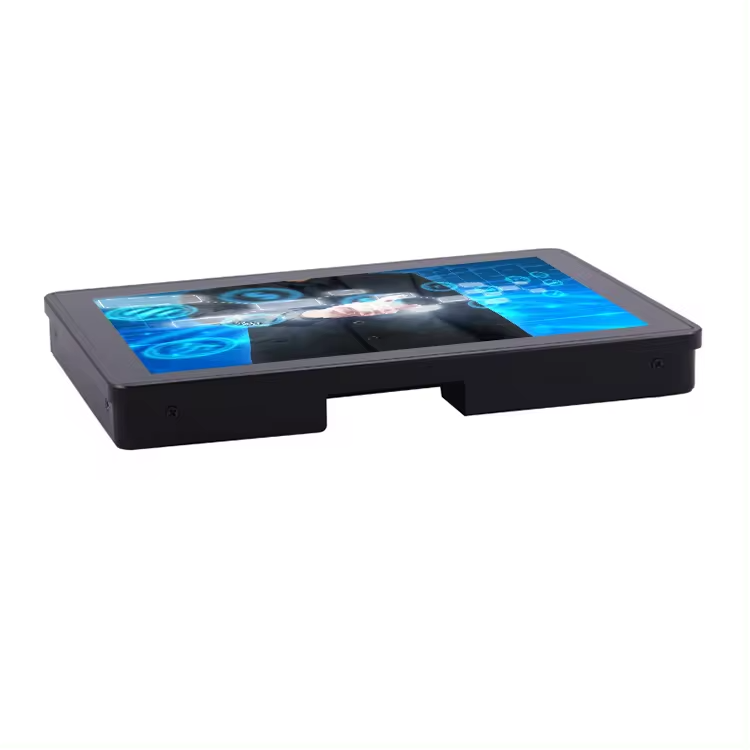
Shenzhen Innoda Technology Co., Ltd. develops customized touch panel products under the INNODAPC brand, with more than 13 years of experience in the industry. Its 7-inch aluminum industrial touch screen monitor combines a 1024 × 600 resolution, 1000–1500 cd/m² brightness, and front IP65 protection. With a single USB port and support for wall-mounted, embedded, and desktop installations, this display offers a practical option for equipment manufacturers seeking a compact industrial interface.
Key Features of the Industrial 7 Inch Monitor
Aluminum Housing and Front IP65 Protection
The monitor uses an aluminum alloy housing designed for industrial equipment integration. Its front panel provides IP65-rated protection against dust and water jets, helping protect the display when installed in suitable enclosures and operating environments.
For applications involving dust, splashes, or routine equipment cleaning, front-panel protection is an important selection criterion. However, IP65 protection on the front does not automatically make the entire monitor waterproof. You should also evaluate rear connections, enclosure design, cable entry points, and installation conditions.
High-Brightness Display for Clear Visibility
The 7-inch LCD/LED panel delivers a resolution of 1024 × 600, a 16:9 aspect ratio, and a specified brightness range of 1000–1500 cd/m². These characteristics support compact interfaces that need to display operating parameters, machine status, and control information.
Key display specifications include:
Screen size: 7 inches
Resolution: 1024 × 600 pixels
Brightness: 1000–1500 cd/m²
Contrast ratio: 700:1
Viewing angle: 80° × 80° horizontally and vertically, as specified
Power input: 12V DC
The high-brightness panel may suit environments with strong ambient lighting. If you plan to install the monitor outdoors or behind protective glass, confirm sunlight readability, reflection performance, and the actual brightness of your chosen configuration before ordering.
Responsive Touch and Flexible Connectivity
The monitor supports projected capacitive (PCAP) touch, which provides responsive multi-touch input for compatible applications. Depending on your project requirements, alternative touchscreen technologies include 4-wire resistive, 5-wire resistive, surface acoustic wave (SAW), and infrared touch.
The listed interfaces and installation options include:
One USB 2.0 port, with USB 3.0 available as an option
One HDMI port
One VGA port
12V DC power input
VESA mounting options of 75 × 75 mm or 100 × 100 mm
Wall-mounted, desktop, embedded, or optional rack-mounted installation
The listed operating temperature range is -20°C to 70°C, while the storage range is -30°C to 80°C. These specifications can help you assess compatibility with industrial machinery and equipment cabinets.
Where Can You Use a 7 Inch Industrial Monitor?
A compact industrial touch screen monitor can support different equipment interfaces depending on your system design.
Industrial automation: Display machine status, operating parameters, and basic control interfaces.
IoT equipment: Provide a local interface for viewing device information and system alerts.
Transportation and logistics: Integrate visual interfaces into compact equipment and control stations.
Fuel stations: Support equipment interfaces where front-panel dust and water protection is relevant.
Food and beverage processing: Provide an operator-facing display when the installation meets the site's hygiene and protection requirements.
Embedded equipment: Fit a small display into a machine panel, cabinet, or custom enclosure.
Before selecting a configuration, consider the installation space, viewing distance, touch requirements, environmental exposure, and available connections.
Industrial 7 Inch Monitor vs. Standard Commercial Monitor
| Selection Factor | Innoda Industrial Monitor | Standard Commercial Monitor |
|---|---|---|
| Screen size | 7-inch configuration | Depends on model |
| Brightness | 1000–1500 cd/m² | Varies by model |
| Front protection | IP65 | Must be verified |
| Housing | Aluminum alloy option | Depends on model |
| Touch input | PCAP and other options | Depends on model |
| Operating temperature | -20°C to 70°C specified | Must be verified |
| Mounting | Wall, embedded, desktop, optional rack | Depends on model |
| Connectivity | USB, HDMI, VGA, 12V DC | Depends on model |
The main advantage of selecting an industrial display is the ability to match its environmental protection, mounting arrangement, temperature range, and interface options to your equipment. You should compare actual specifications rather than assume that every industrial monitor outperforms every commercial model.
How to Select the Right 7 Inch Industrial Monitor
Follow these steps before placing an order:
Define the application. Identify whether the display will be used in a machine cabinet, control panel, transport system, or another environment.
Confirm visibility requirements. Check whether the 1024 × 600 resolution and 1000–1500 cd/m² brightness range suit your interface and ambient lighting.
Choose the touchscreen technology. Select PCAP for compatible multi-touch applications or evaluate resistive, SAW, and infrared alternatives for your operating conditions.
Check environmental protection. Verify whether front IP65 protection is sufficient or whether your installation requires additional enclosure protection.
Confirm mounting and interfaces. Check the USB, HDMI, VGA, 12V DC, and VESA requirements against your existing system.
Discuss customization. Contact Shenzhen Innoda Technology Co., Ltd. to confirm available housing materials, colors, interface configurations, and OEM/ODM requirements.
FAQ
1. Is the Innoda 7 inch industrial monitor waterproof?
Its front panel is rated IP65 for dust and water-jet protection. This does not establish that the complete monitor can be immersed in water. Verify the protection level of the full assembly and installation before use.
2. Can I choose a different touchscreen technology?
Yes. The specifications list PCAP, 4-wire resistive, 5-wire resistive, SAW, and infrared touch options. Availability and suitability should be confirmed for your required configuration.
3. Does this industrial monitor support embedded installation?
Yes. The listed mounting options include embedded installation, wall mounting, desktop mounting, and optional rack mounting. The specified VESA patterns are 75 × 75 mm and 100 × 100 mm. Confirm the dimensions and mounting details before integrating the display into your equipment.
Conclusion
Choosing an industrial 7 inch monitor requires more than checking screen size. You need to consider brightness, touch response, front-panel protection, operating temperature, connectivity, and mounting compatibility. The Innoda 7-inch aluminum industrial touch screen monitor combines a 1024 × 600 display, 1000–1500 cd/m² brightness, front IP65 protection, and multiple installation options in a compact format. By matching these specifications to your equipment and operating environment, you can make a more informed purchasing decision.
CTA
Planning to integrate a 7-inch industrial display into your equipment? Contact Shenzhen Innoda Technology Co., Ltd. through the official contact page to discuss your application, touchscreen requirements, mounting dimensions, and OEM/ODM customization options.

