



time:2026-11-24 10:57:37 views:
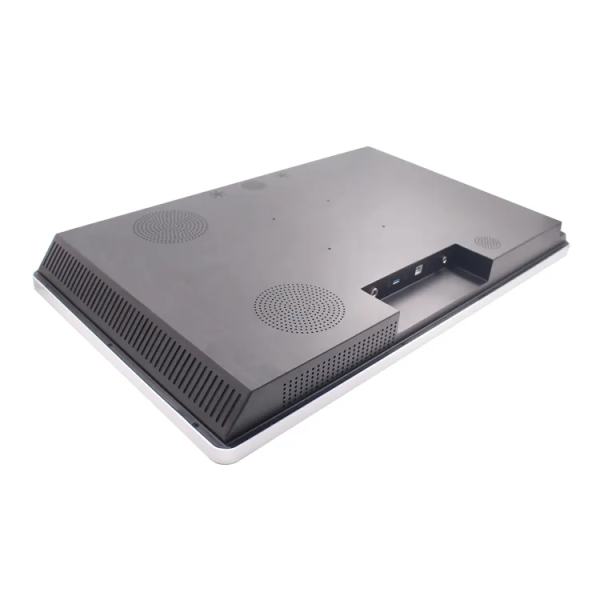
When you operate machinery, monitor production lines, or manage industrial equipment, a standard desktop computer may not withstand the demands of your working environment. Dust, moisture, frequent touch interactions, and continuous operation can affect equipment reliability. An industrial touchscreen panel PC provides an integrated computing and display solution designed for these conditions. The INNODA IND270PC combines a 27-inch industrial display, capacitive multi-touch technology, an aluminum alloy enclosure, and an IP65-rated front panel. With configurable hardware, multiple connectivity options, and mounting flexibility, it helps you build a practical control and monitoring system for different industrial applications.
Why Choose a 27 Inch Industrial Touchscreen Panel PC?
Screen size, durability, and computing performance directly affect how efficiently you interact with industrial systems. A 27-inch industrial panel PC provides a larger working area than compact embedded computers, making it suitable for applications that require detailed visual information and frequent operator interaction.
The INNODA IND270PC features several design elements that support industrial use.
Large Industrial Display for Clear Visibility
The 27-inch LCD/LED display provides a 16:9 viewing area for operating interfaces, production data, and monitoring dashboards.
Its listed display specifications include:
Screen size: 27 inches
Standard listed resolution: 1920 × 1080
Brightness: 350 cd/m² in the configuration table
Contrast ratio: 500:1
Capacitive multi-touch screen
Industrial LCD panel with wide viewing angles
For projects requiring higher brightness, INNODA also lists optional brightness configurations ranging from 350 to 1500 nits. You should confirm the actual brightness level when selecting your configuration, particularly if the PC will operate in a brightly illuminated environment.
Multiple Interfaces for Industrial Integration
An industrial touchscreen computer must communicate with other equipment. The IND270PC supports multiple connection options, including:
USB ports for peripherals and external devices.
HDMI and VGA for display connectivity.
RJ45 for wired network connections.
RS232 and COM interfaces for serial communication.
Audio connections for compatible external equipment.
Optional functions such as RFID, NFC, GPIO, CAN bus, and 3G/4G connectivity can also be discussed for projects that require additional integration capabilities.
Where Can You Use a 27 Inch Industrial Touchscreen PC?
A large-format industrial touch panel computer can support different operational tasks across multiple industries.
Manufacturing and Industrial Automation
You can install the panel PC near production lines to access machine interfaces, monitor operating parameters, and interact with automation software. Its capacitive touchscreen makes direct operator input convenient.
Control Rooms and Equipment Monitoring
The 27-inch display provides space for dashboards, process information, and monitoring interfaces. Operators can view multiple data elements without relying on a small embedded display.
Warehousing and Logistics
In warehouse environments, the panel PC can support inventory management, equipment monitoring, and logistics software. Its network connectivity helps integrate it with existing systems.
Food and Beverage Processing
The enclosed design and IP65-rated front panel make the device suitable for applications where dust and water splashes are potential concerns. You should still follow the site's cleaning procedures and verify chemical compatibility before installation.
How to Select the Right Industrial Touchscreen Panel PC
Choosing the right industrial computer requires more than comparing screen sizes and processor specifications. Follow these steps to identify a suitable configuration.
Define your application: Determine whether you need machine control, production monitoring, warehouse management, or another industrial function.
Select the screen size: Choose a 27-inch display if your operators need a larger interface and more visible information.
Confirm protection requirements: Check whether an IP65 front panel is sufficient for your installation environment.
Choose the processor and memory: Match the CPU, RAM, and SSD capacity to your operating system and application workload.
Check connectivity: Confirm the required USB, HDMI, RJ45, RS232, GPIO, or other interfaces before ordering.
Determine the installation method: Select wall mounting, desktop placement, embedded installation, or rack mounting according to your equipment layout.
Discuss customization: Work with the manufacturer to confirm hardware compatibility, enclosure requirements, and optional functions.
INNODA Industrial Panel PC vs. Standard Commercial PC
A standard commercial computer and an industrial touchscreen panel PC serve different working conditions. Understanding their differences helps you select equipment that matches your operational requirements.
| Comparison | INNODA Industrial Panel PC | Standard Commercial PC |
|---|---|---|
| Enclosure | Aluminum alloy or metal | Commonly plastic or standard metal |
| Front Protection | IP65-rated front panel | Usually no IP-rated protection |
| Touch Interaction | Capacitive multi-touch | Depends on configuration |
| Operating Temperature | Listed -20°C to 60°C | Varies by model |
| Mounting | Wall, embedded, desktop, rack | Primarily desktop |
| Industrial Interfaces | RS232, USB, RJ45 and optional interfaces | Depends on model |
| Operating Mode | Designed for industrial applications | General-purpose computing |
If your installation involves dust, water splashes, industrial equipment integration, or continuous operation, an industrial panel PC may be more appropriate than a conventional office computer.
Why Work with INNODA for Custom Industrial Panel PCs?
Shenzhen Innoda Technology Co., Ltd. has more than 13 years of experience in customized touch panel products under its INNODAPC brand.
The company focuses on fanless industrial panel PCs, waterproof touch panel PCs, embedded panel PCs, Android touch PCs, touchscreen monitors, and intelligent access control products.
Its manufacturing and R&D capabilities support OEM/ODM projects, allowing you to discuss product configurations according to your application requirements.
INNODA also provides products with CE, RoHS, and FCC certifications, alongside models carrying different IP protection ratings, including IP65, IP66, IP67, IP68, and IP69K.
Before purchasing, you can discuss the following requirements with its technical team:
Screen size and display brightness.
Processor, memory, and storage configuration.
Touchscreen technology and front-panel protection.
Interface combinations and optional modules.
Enclosure materials and installation methods.
Frequently Asked Questions
2. Can I customize the processor and memory of the INNODA IND270PC?
Yes. INNODA lists Intel Celeron and Core i3/i5/i7 processor options, with memory configurations of 4GB, 8GB, 16GB, and 32GB. Confirm the compatible motherboard and exact hardware combination with the manufacturer.
3. Can the 27-inch industrial panel PC operate continuously?
The product is designed for 7×24 continuous operation. However, actual operating stability depends on the selected hardware, installation conditions, cooling requirements, and application workload.
Conclusion
Selecting the right industrial touchscreen panel PC means balancing display size, computing performance, environmental protection, and connectivity. The INNODA IND270PC offers a 27-inch display, capacitive multi-touch operation, an aluminum alloy enclosure, IP65 front-panel protection, and configurable hardware options. With more than 13 years of customized touch panel experience, Shenzhen Innoda Technology Co., Ltd. can support OEM/ODM requirements for different industrial applications.
Looking for a customized 27-inch industrial panel PC?
Contact INNODA to discuss your required processor, memory, display brightness, touchscreen specifications, interfaces, and mounting options. Share your application requirements to receive a suitable configuration proposal for your project.

